

ATS-Friendly Resume Guide for Pakistan (2026)
Quick Answer: This ATS-friendly resume guide covers using simple formatting, standard section headings, and keywords matched to the job description, while avoiding complex graphics, tables or columns that automated screening software may fail to read correctly. This ensures your resume gets seen by a human recruiter rather than filtered out early.
Many mid-to-large companies in Pakistan, especially multinational corporations and larger local employers, use Applicant Tracking Systems (ATS) to screen resumes before a human ever sees them. This ATS-friendly resume guide explains how ATS works and how to format your resume to pass through it successfully.
Table of Contents
- What Is an ATS and How It Works
- Formatting Rules for ATS Compatibility
- Using Keywords Effectively
- Section Headings ATS Systems Recognize
- What to Avoid
- Testing Your Resume for ATS Compatibility
- ATS Optimization Roadmap
- Tips and Common Mistakes
- Frequently Asked Questions
What Is an ATS and How It Works
Best for: Job seekers applying to mid-size and large companies in Pakistan, particularly multinational corporations and structured corporate employers.
An Applicant Tracking System (ATS) is software that scans, parses and ranks resumes based on how well they match a job description, often before a human recruiter reviews them. If an ATS can’t properly read your resume’s formatting, even a strong candidate can get filtered out. This ATS-friendly resume guide is designed to prevent exactly that.
Formatting Rules for ATS Compatibility
Required Practices:
- Use a single-column layout rather than multi-column designs
- Use standard fonts (Arial, Calibri, Times New Roman)
- Avoid embedding text inside images, graphics or text boxes
- Use standard bullet points, not decorative symbols
- Save as a .docx or standard PDF (avoid image-based PDFs)
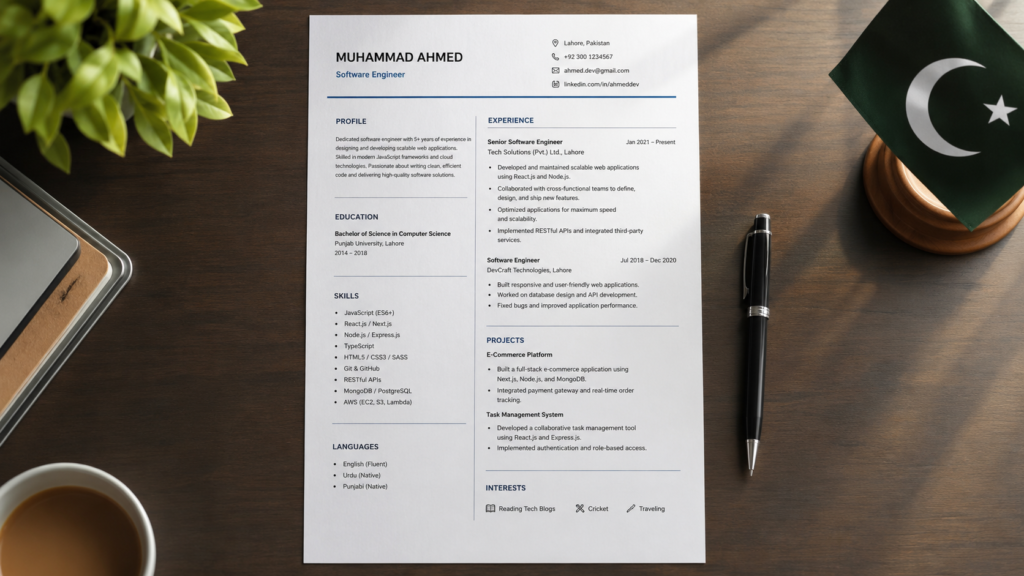
A single-column layout with standard fonts is more reliably read by ATS software.
Using Keywords Effectively
Required Skills:
- Reading the job description carefully for exact terminology
- Matching your resume’s language to the job posting where genuinely accurate
- Including both the full term and common abbreviation (e.g., “Search Engine Optimization (SEO)”)
Career Roadmap: Read Job Description → Highlight Key Terms and Required Skills → Naturally Incorporate Matching Keywords → Avoid Keyword Stuffing → Submit Tailored Resume
Pro Tip: If a job description says “project management,” use that exact phrase somewhere on your resume rather than only writing “managed projects” — ATS systems often match exact phrasing. This is one of the most important rules in any ATS-friendly resume guide.
Section Headings ATS Systems Recognize
Use standard, recognizable headings rather than creative alternatives:
| Use This | Avoid This |
|---|---|
| Work Experience | My Journey |
| Education | Academic Background |
| Skills | What I Bring |
| Contact Information | Reach Me |
What to Avoid
- Headers and footers containing important information (some ATS systems don’t scan these)
- Tables and columns for layout structure
- Images, logos, or graphics with embedded text
- Unusual fonts or heavy stylization
- Uncommon file formats (stick to .docx or standard PDF)

Matching resume language to the job description improves ATS screening results.
Testing Your Resume for ATS Compatibility
Required Skills:
- Basic understanding of how to copy and review plain text
- Attention to formatting details
Consider: Copy and paste your resume content into a plain text document. If the information appears jumbled, out of order, or missing sections, an ATS may have similar trouble parsing it.
For general documentation standards, you can also reference resources from the Higher Education Commission of Pakistan.
ATS Optimization Roadmap
Choose a Simple, Single-Column Format → Use Standard Section Headings → Match Keywords from Job Description → Avoid Graphics, Tables and Text Boxes → Test by Copying Content to Plain Text → Save as .docx or Standard PDF → Submit
Tips and Common Mistakes
- Don’t sacrifice ATS compatibility for a visually elaborate design, especially for larger companies.
- Avoid over-stuffing keywords unnaturally — this can hurt readability for human reviewers.
- Double-check that your contact information isn’t placed only in a header/footer that some ATS systems skip.
- Use both spelled-out terms and common abbreviations for key skills or qualifications.
- Don’t assume every company uses an ATS — smaller or more traditional employers may not, but simple formatting rarely hurts either way.
Frequently Asked Questions
Q1. Do all companies in Pakistan use ATS software?
Not all, but many mid-size to large companies, especially multinational corporations, do use ATS systems to screen initial applications.
Q2. What file format is best for an ATS-friendly resume?
A .docx file or a standard, text-based PDF (not an image-based PDF) generally works best for ATS compatibility.
Q3. Can I still use bold and bullet points in an ATS-friendly resume?
Yes, standard formatting like bold text and simple bullet points is generally ATS-compatible; it’s complex graphics, tables and columns that cause issues.
Q4. How do I find the right keywords for my resume?
Carefully review the specific job description and identify the skills, qualifications and terminology used, then incorporate matching language where genuinely accurate.
Q5. Will a creative resume design always fail ATS screening?
Not always, but highly designed resumes with multiple columns, graphics or text boxes carry higher risk of being misread or improperly parsed by ATS software.
Q6. Should I use a resume template downloaded from Canva or similar tools?
Many of these are heavily designed and may not be ATS-friendly; if using one, check the layout for tables, columns, or graphics and simplify if needed for ATS-heavy applications.
Q7. What happens if my resume fails to pass an ATS scan?
Your resume may not be seen by a human recruiter at all, regardless of your actual qualifications, making ATS compatibility a critical first hurdle for larger company applications.
Q8. Is keyword stuffing an effective ATS strategy?
No, unnatural keyword stuffing can hurt readability for human reviewers who see your resume after it passes initial screening, and some ATS systems can also flag this as manipulation.
Q9. Do smaller companies or startups in Pakistan use ATS software?
Less commonly than larger companies, though it varies — using clean, simple formatting is a safe default regardless of company size.
Q10. How can I check if my resume is ATS-friendly?
Copy and paste your resume content into a plain text document and review whether the information remains clear, complete and correctly ordered.
Q11. Should headers and footers be avoided entirely on a resume?
It’s safest to keep essential information like your name and contact details in the main body of the document, rather than solely in a header or footer.
Q12. Does font choice really matter for ATS compatibility?
Yes, standard fonts like Arial, Calibri or Times New Roman are more reliably parsed by ATS software than decorative or unusual fonts.
Summary
Following an ATS-friendly resume guide — using simple, standard formatting and carefully matched keywords — ensures your resume passes through automated screening software used by many mid-size and large companies in Pakistan. Prioritizing clarity and compatibility over elaborate design significantly improves your chances of reaching a human recruiter.
Key Takeaways
- Use simple, single-column formatting with standard fonts and headings.
- Match keywords from the job description naturally, without overstuffing.
- Avoid graphics, tables, text boxes and unusual file formats.
- Test your resume by copying it into plain text to check for parsing issues.
- ATS compatibility matters most for mid-size to large and multinational employers.
Suggested Reading
Before applying, also review our best resume formats guide, learn how to list skills on your resume, or check common resume mistakes to avoid.
Official Resources
Readers should verify specific application system requirements directly from individual employer job postings.